
Obtrusive JavaScript Checker 0.8 – proper Firefox extension release with live enabling and disabling
It was time for me to stop being a whiny lazy developer, and instead properly learn to develop Firefox extensions. So. the result is version 0.8 of Obtrusive JavaScript Checker, as a very much improved Firefox extension.
Firefox extension
The new Obtrusive JavaScript Checker Firefox extension has been developed from scratch, and as opposed to before, it is now disabled by default, meaning no more auto-run. You have four different ways to call it yourself and run an analysis of the current web page:
Statusbar icon
 You now have a small statusbar icon which basically lets you toggle the Obtrusive JavaScript Checker: click it to run, and click it again to hide the results.
Keyboard shortcut
 For keyboard shortcut lovers, such as myself, there’s now a key combination to press to invoke it: Ctrl + Option (alt) + Command + O on Macs, and Ctrl + Shift + Alt + O on Windows.
Tools menu
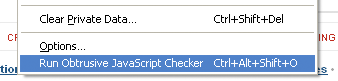 It is also available from the Tools menu as one of the menu items there.
Toolbar button

 Another option is to customize your toolbar, and drag the Obtrusive JavaScript Checker toolbar button to your regular toolbar.
Available from addons.mozilla.org
To make it more official and to be able to offer secure and automatic updates, you can now get the Obtrusive JavaScript Checker Firefox extension at addons.mozilla.org. Note: if you have a previous version of it installed, make sure to remove it first. This is a one-time action, and in the future, updates will be pushed out.
Download it!
So, make sure to download the Obtrusive JavaScript Checker Firefox right now, to complement your already existing crucial web developing add-ons! 🙂
Great work!
I would be great if you could join forces whit other extension developers and make it bundled into Web Developer Toolbar or Firebug.
Thanks for the update. The Greasemonkey version is good but this is better. I do agree with Pablo and the possibility of Firebug integration. Bloody well done!
Hi Robert,
very nice work, and I second Pablo's suggestion that it would be great if it could get integrated in something like Web Developer Toolbar.
one small thing: when I use it on the mozilla page ( the mozilla page) the gray box is too small to contain the javascript so I'm missing parts. Otherwise: great !!
I just read all previous posts on Obtrusive JavaScript Checker. Brilliant ideae, Robert! Well executed too. One new extension in the really short keepers list 😀
Thanks everyone! 🙂
While I like it to be stand-alone, since it gives me more option to let it evolve and for me to adapt in different ways, I definitely understand your desires about integration into other tools.
I don't want to say more right now, but let's just say I have some ideas… 🙂
RobertDM,
Never actually considered such long oneliners without spaces or anything! 🙂
In the next version, the dialog will grow width-wise as well, if necessary.
Could you put out a version that works with Firefox 3.1?
Tanny,
Next version will be. although I'd prefer for it to be out of beta first. But please let me know if you want me to e-mail you a test version.
Nice tool. It really made me take a look at how I implement JavaScript.
I would love if I could remove the icon from the status bar.
Mike,
Thanks. In the future, it might be a preference option to remove it.
Thanks, this is great!
One suggestion: the border:2px solid red on checkboxes has no effect. Could you change it to outline:2px solid red? I'm not sure if this would work on all elements though.
Also, it would be nice to be able to move the gray box to other parts of the screen.
Thanks!
Dave,
In a future version, it will be outline instead. As for moving the report box, it's not planned right now, but since it's fixed, you can always scroll it away.