
Tabbing problems in Firefox in Mac OS X
Recently I got a bug report from marketing (don’t all bug reports come from there? 😉 ), about an unexpected problem in Firefox in Mac OS X. The end users had problems tabbing through the web page, and especially through forms. Since I, at the time, sat on a PC, I couldn’t test with my settings, although I knew I hadn’t seen the problem on my Mac at home.
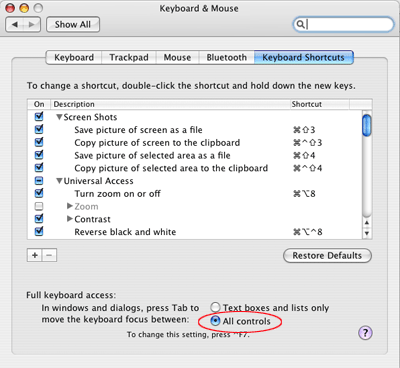
Not resorting to the option of having the code riddled with tabindex attributes, since it didn’t seem like the best way to go, I instead did some online research to see if it was due to any setting in Firefox or something similar. The solution I found to the problem was somewhat unexpected. How to address this is that the end user have to turn on Full keyboard access > All controls in System Preferences for it to work as expected. Like this:
- Open System Preferences
- Go to Keyboard & Mouse
- Select All controls for Full keyboard access
The interesting thing to note here is that this behavior doesn’t occur in Safari, so it’s a Firefox-specific problem. I’m not sure why they’d implement it this way in the first place, either. Kind of hard to have a web site with support e-mails coming in, and the reply is that they have to change their system settings…
After a bit of digging around in bugzilla it appears this is done on purpose for Firefox, even though Camino works fine.
More digging revealed that this can be changed quite easily.
Basically go to <code>about:config</code> and set/add <code>accessibility.tabfocus</code> to either:
3 to be able to tab to form controls or
7 to be able to tab to everything
And other values would limit/extend what gets tabbed to.
Some more details about the specific values.
In Camino Preferences | Web Features there's a section:
<code>Tab selects text fields and:
[x] Form buttons, pop-up menus and lists
[ ] Links and linked images</code>
The default is the top checkbox being checked.
The values for <code>accessibility.tabfocus</code> match the following states of those text boxes:
1 – Neither checkboxes checked.
3 – Top checked: Only text fields and form controls
5 – Bottom checked: Only text fields and links and linked images
7 – Both checked: Text fields, form controls and links
Kanashii,
Great digging! Good to know that it can be changed in Firefox, although I still can't understand why the default option would be the least accessible one to the end user.
[…] 2 different solutions. I “googled” all sorts of combination of words until I discovered Robert’s Talk web blog. I was so happy there was someone else determined to find a solution to this horrible flaw […]
[…] Tabbing problems in Firefox in Mac OS X […]
nice article, thanks. For those who still use i.e.; Firefox is really faster.
oh, my god, THANK YOU! This has been bugging me since I first started using my new MBPro last summer!
Matt,
I'm happy it helped! 🙂
[…] Tabbing problems in Firefox in Mac OS X – Robert’s talk – Web development and Internet trends How to fix the problem of not being about to tab into check boxes in Firefox on OS X (tags: firefox howto mac webdesign osx tab solution) […]
This has annoyed me about Firefox on the Mac for a long time. My mac user friends didn't even realize this problem. Your blog helped me solve it. Thanks!
Joe,
Good that it helped you out!
Robert, my good man. You came up on top of the google results for my search for this.
And you saved me much frustration. Thank you.
Paul,
Great that it helped you out!
This is great Robert (and fair play to Kanashii for finding the Firefox specific fix). It is a little troubling that this problem exists with Firefox however. I wonder how many people have just put it down to shoddy form implementation in Firefox and switched to something else?
It would be interesting to see if Firefox 3 can tab properly through forms on the Mac 'out-of-the-box' so to speak.
Just tried this on FF3 RC3 and the about:config option isn't there.
ignore me – forgot how to add items!
Kanashii & Robert,
Great info!
Just started using my new MacBook a few weeks ago and this was Bugging me.
I set to 7 on Firefox, and navigating/filling out forms is MUCH easier now. Thanks!
In constructing my site with I Web, I used regularly updated Leopard, most recent version of I Web, IPhoto and my websites menu bar is not visible using Firefox on any of a dozen pc's I have tried and it displays erratically with the background of each page with Internet Explorer. Apple store geniuses and one to one consultants say they have no idea and never heard of this issue.
Any ideas ?
Thanks !
H Steele,
Sorry, but I can't help you.
Ha, I had just filed a bug report for a web app, only to learn it is a "feature" 🙂 Thanks for explaining this clearly and concisely…it was the first link i choose on my google search, and solved the problem.
BTW: Safari 3 did exhibit this behavior for me…
Stu
Stu,
Good that it helped! Interesting about Safari, I didn't know that.
[…] as I expected, it turned out to be a combination of OS X prefs and Firefox settings. The key is in this article on tabbing problems in Firefox (which, to my amusement, includes notes on setting this in Camino as […]
This is the second time I've landed on your site when I've been searching for elusive answers – thank you!
So I have a question, do you know if this is also a problem in Opera? I can't seem to tab at all on web pages I know are keybard accessible. Any ideas?
angela,
Glad I can be of assistance! 🙂
Sorry about Opera, though, I have no idea.
Thank you so much for that! It was really bugging me!
BTW Safari may not be effected by changing this preference because you can set this option "Press tab to highlight each item on a webpage" in the Safari Advanced preferences. Thanks again!
kate,
Glad it helped!
Thanks for mentioning about Safari too.
nice article…
Love it. Thanks!
Glad it helped you!
Thanks for this, a quick search solved this annoying problem.
James,
Glad it was of help!
Boom! Worked like a charm… only slight diff is that in the newer version of OSX Keyboard and Mouse are separated under System Preferences. If you open Keyboard and then click on Keyboard Shortcuts you will see the same radio button (pictured above).
Thanks Robert!
Ryan,
Glad it was of help!
And thanks for the update of the new Preferences location!