
Firefox and Safari, implement the Zoom feature!
Say that you’re using a web page and you find the text, the images or the layout in general too small. What do you do? Some web browser makers understand just how important this issue is and some don’t; some have set a good example and some still linger on under the impression that being able to resize text is sufficient.
Who are the good guys here? Microsoft and Opera.
To my knowledge, Opera implemented the Zoom feature a long time ago and Microsoft made the excellent move of following this with their IE 7 release. The whole basis of a Zoom feature is that everything in a web page scales proportionally, making everything bigger or smaller, according to your liking. As opposed to just text resizing, which normally results in giant fonts in fixed pixels-columns, this is useful for every end user no matter how poor the the web site is coded.
Interesting to note here is that the two web browsers that support this are both on Windows (and Opera on Linux as well); no web browser supports this on a Mac!
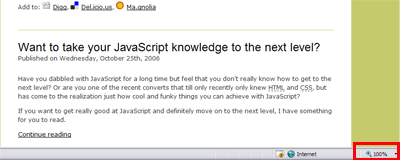
The zoom feature in IE 7
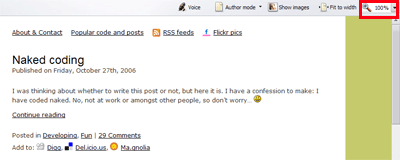
The zoom feature in Opera 9
Keyboard and mouse shortcuts
In both IE 7 and Opera 9, you can hold down the Ctrl key while scrolling with the mouse wheel to zoom in and out.
Keyboard shortcuts for IE 7
Zoom in respectively out: Ctrl + +/-.
Restore it to the default 100% zoom: Ctrl + 0.
Keyboard shortcuts for Opera 9
Zoom in respectively out: +/-.
Restore it to the default 100% zoom: * (in my opinion, this is a bad choice since it doesn’t work on non-English keyboard layouts).
Default Zoom settings
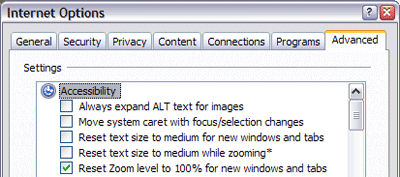
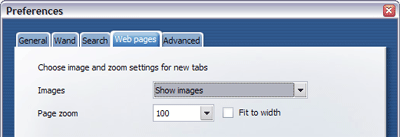
Well hidden away, in Internet Options in IE 7 and Preferences in Opera 9, you have the possibility to decide what the default zoom setting for newly opened tabs should be.
It can be found for IE 7 under Internet options > Advanced > Accessibility:
It can be found for Opera 9 under Preferences > Web pages:
A Web Developer and designer perspective
A fantastic benefit of the Zoom feature is to finally be able to make the designers happy. If you have a design of a web site where everything on it has a relation to the other parts, for instance, with a nice grid system layout, everything will still look the same! No relations lost! Only difference is that it will be bigger or smaller.
Firefox and Safari, step up! Implement the Zoom feature now! Put the end users in control of their web surfing! Everyone, end users, web developers and designers alike, will be happy, grateful and will spread the name of your product!
I suggested this to the firefox development team some time ago (prior to 1.5), and not only done by means of short cut keys, but also via a button on the main browser window. back / forward / refresh / zoom in / zoom out / home
I was basically fobbed of with comments to the effect that something better was on the roadmap (though obviously not in 2.0)
I think that all browsers should not only have this feature, but make it patently obvious to the average user. It is amazing how many people I come across who do not even realise that text can be resized.
– Rob
In the meanwhile, apart from a color picker ColorZilla also supports zooming to some extent.
Yeah, text-resizing is a little lame. On your Mac in the mean time you can ctrl+scroll for system wide zooming. It doesn't make much sense for Safari not to be able to do it when the OS can although since the OS can I guess Safari doesn't need to. But Firefox still should implement it.
Everything, that is, except any background images set for <code><body></code> in IE7, which can break many layouts horribly.
Couldn't agree more.
In the meantime making sure you use resizable text is a must.
I recently saw my 65 year old mum resizing text in IE6 so she could read it.
Too many sites have fixed text size and until browsers catch up on the zoom tool it is an important feature for many short sighted readers.
> no web browser supports this on a Mac!
Opera in Mac supports zooming, no?
Cmd + [+]/[-] zooms in/out text in Safari. Or did I miss something out here?
Ok, I did miss things out. My previous message relates to text scaling.
On the other hand, zooming a whole webpage might sound like a good idea, but will trash images etc into a pixel mess. Again, you have the opportunity to anti-alias the whole screen by juggling the scroll wheel whilst pressing the Ctrl-key on the mac. Blablabla.
Ctrl + [+]/[-] zooms in/out text in Firefox too and on Windows I have found I can use CTRL+scroll as well.
I agree that Page Zoom is different from Text Zoom, but agree with Markus' objections against it.
Is there an extension for Firefox that zooms text+images like Opera does?
Here's the complete list of zoom shortcuts:
Ctrl + Mouse Wheel Up, Numpad 0, or +: 10% zoom increase
Ctrl + Mouse Wheel Dn, Numpad 9, or -: 10% zoom decrease
Numpad 8: 100% zoom increase
Numpad 7: 100% decrease
Ctrl + Mouse Wheel Click, Numpad 6, or *: Default Zoom
So, if you're on an international keyboard layout, you can use Numpad 6 or Ctrl + Mouse Wheel Click to return to your default zoom (which can be set in Tools->Preferences->Web Pages)
Forgot to mention that the shortcuts in my last comment are for Opera (Robert, if you want to combine this comment with the above, that would be great)
Apart from usability; it's great to check if your container-div really, really is the exact same width as, say, your navigation bar and not 1 pixel too wide or narrow due to some margin/padding/browser differences 🙂
Rob, Opera for Mac does zoom the whole page, same as it does on Windows/Linux.
I totally agree this is by far the best way to zoom the page, and to those worried about pixellation, the images/graphics scale up pretty darn well – at least they do on my sites 😀
C'mon Safari/FF devs, get it sorted!!!
There is indeed a Firefox add-on called Reveal that performs a Zoom. However, not available yet for Firefox 2.0
I am not a fan of whole page zooming. In Opera it sort of works, but the flawed zooming Microsoft has implemented in IE 7 is pretty lame. I'm all for it being implemented in Webkit and Gecko but it isn't anything I'll use.
Rob,
Absolutely, it should be very easy for them to see that this feature is present. Also, sad to hear about your experience with the Firefox team, although it gives hope for the future if they have something interesting lined up.
Stijn,
Thanks for the tip,
Kanashii,
It is nice with the system-wide Mac OS X feature, although I think it really should be in the web browser and customizable there, and so the user can see the current zoom level in numbers. Besides, the Mac OS X zooming is only making things larger, not smaller.
Andrew,
Hmm, interesting (and annoying). Thanks for sharing!
Absolutely, but I hope it's just for an interim period.
Good to hear about your mom! 🙂
David,
Absolutely, I stand corrected! Thanks for pointing that out.
markus,
My take is that it does resizes images and their pixels fairly well. Of course it's not as good as the original, we'd need solely vector graphics for that, but I still think its sufficient.
And, as i said above, I think such a feature belongs in the web browser, although of course it's good that it's system wide as well.
Jordan,
Ah, good, thanks! Still don't like the restore to normal options for Opera, though. 🙂
Also, when I finally read this, there were other comments as well, so I just kept your comments as two. I hope it's ok.
Harmen,
But of course… 🙂
Steve,
Absolutely, I missed that about Opera. And good to see that you share my opinion about the quality of resized images.
Lar,
Thanks for the tip! Here's a link to it: Reveal extension for Firefox.
Roger,
No, no, you're just not a convert. Yet. 😉
But yes, the zooming features in both web browsers mentioned here have issues to address, but I still think it's a step in the right direction.
Umm… For MAC, I don't see much use for that.
To zoom in ANYTHING, I press CTRL and scroll wheel on my mouse. It zooms in. 🙂
So, although the feature isn't presented directly, I can still manage to use Zoom.
It's my understanding that this is one of the main the reasons Firefox is moving to Cairo for Firefox 3.0, because it will enable them to easily implement zooming.
But it does! You can use the '*' on the numeric keypad. '6' will also reset the zoom to 100% in Opera.
You can build websites that scale in FF and Safari, you just have to build them in EMs not pixels.
The advantage of building sites in EMs instead of pixels is you can use a little js to scale the site to fit the browser window. The main reason for doing this, is the increasing number of people using high density monitors ie 150 pixels per inch of the WUXGA 1920×1200 15.4 inch screens in some laptops. These people will really appreciate page zoom, but is it is better to say, hey you have a high density screen (or a wide browser window) and adjust the website to fit?
Example my blog Warning it was a proof of concept, thar never got finished. Drag your browser window to scale the webpage, anything from 600px+.
Most browsers do a decent job of scaling jpgs, scaling gifs is a problem. But you can use flash to scale vector images.
Wayne,
Well, as noted above, not everyone knows about system-wide Mac keyboard shortcuts. To target every user, I think a digit should be displayed in the web browser, displaying the current zoom level.
Rowan,
Interesting. Time will tell, I guess… 🙂
Tommy,
Ah, but for the majority of users, like me, are on laptops and don't have a numeric keypad. Besides, I personally prefer Ctrl + 0 a lot more. 🙂
Nick,
The problems with designing with <code>em</code> is that that the result varies a bit in different web browsers, and the web developers have to do math to know how many actual pixels a certain value in <code>em</code> corresponds to.
Regarding JavaScript: while I love it, I don't want a layout to be dependant on it (at least not just for scaling purposes).
High density monitors is an interesting challenge, but I think zooming targets that as well as designing with the <code>em</code> unit.
I like the scalability of your web site, and this web site is built the same way (just resize the web browser window, change the text size etc, to see it in action).
Zoom page is the best thing for high density monitors, I have just spent the last six weeks using a 15" laptop with a 1600×1200 screen. I am using Opera more and more (IE7 is not an option on Ubuntu), otherwise websites are just to small.
I want page zoom in Firefox (my preferred browser, because of the developer tools) and Safari soon. Otherwise I may be lost to Opera.
Nick,
Interesting to hear. My hope is that Firefox and Safari will address this as soon as possible in the way they seem fit.
I use Firefox and have decent eyes, however if I'm reading a website and the font size is smaller than the font size on this site website for example, I will resize the text. It just makes reading easier. But I only want to increase the text size and not the images because they will then become pixellated, look rubbish and become less readable (if text is in the images).
However I appreciate what Opera's page zoom does and it doesn't break the layout or force text off screen horizontally. But IE7's page zoom is pretty poor. Zoom in on a site with a fluid layout and at 110% the text has already been forced off screen, meaning you have to use the attractive horizontal scrollbar that has just appeared to continue reading. Hmmm, usability has just taken a hit here. As Nick Cowie mentioned above, build your site in ems (and use CSS well) to produce a good scaling website.
But I think Firefox should introduce a page zoom feature (to help out PC users), but it shouldn't take away the text zoom feature and should allow the user to decide which zoom feature is the default (controlled using Ctrl + Scroll).
Richard,
I agree that there are times when you want to slightly resize the text only, so zoom and changing text size shouldn't be exclusive features. In the end, it's all about giving people options.
[…] are just a bunch of radio buttons and labels, stacked Some blogbuzz/discussions on this: Firefox and Safari, implement the Zoom feature! Just make su […]
I'm confused. Macs have scrollwheels?
Zack,
Yes. 🙂
Macs support any USB mouse that you can use on a PC.
[…] bsp; Related reading Web browser vendors are also responsible for accessibility Firefox and Safari, implement the Zoom feature! […]
Whether or not page zooming is a good idea is, to me, a total non-issue. It's almost like continuing to debate whether or not CSS is a good idea. Like it or not, it's here, and every modern browser should implement it, not just because it exists but it's the only way forward.
A common dismissal of page zooming is: "the designers should've used 'em's, not fixed units". Nope, for 2 reasons:
1. Designing with pixel/pt units is not only perfectly valid use of CSS but is the method employed by a certain majority of websites. If designing this way is "bad practice", many of the best designers on the web are doing it "wrong" — even if their code validates and there's not one table used for anything other than tabular data. Designers are already under enough peer pressure to produce sites that use nothing but CSS for layout, are XHTML 1.1 Strict compliant, are accessible to the disabled and still look attractive on browsers several versions out of date. The last thing they need is to be told they're all doing it wrong because someone decided "Page Zoom is bad, mmkay".
2. More to the point, it's practically pointless sizing divs/text on your page in 'em's if nothing else on the page will resize with them. Most sites use images as a part of their layout and to spruce up the body text. If your company logo is an image, your navigation links are images, your 'faux columns' background uses an image, your fancy-styled titles are images, your bullet points are images, etc., you will have a site that when scaled not only becomes more and more visually repulsive but becomes increasingly difficult to read rather than decreasingly so. Sure, your body text is more legible, but not only is it all squeezed inside a fixed-width faux column background image but all the title images are smaller than the text below them and the navigation images are microscopic!
Another argument is that images will become "pixellated" if zoomed. Look at images enlarged by Opera's Page Zoom, by IE's Page Zoom or even by the Windows Picture and Fax Viewer. Are they sharply pixellated? No. The software is able to smoothen it out. Besides — if ones vision is so impaired as to require zooming in that far, I doubt pixellation is the first concern on ones mind!
Maybe if we were still in the mid-90's, when the only images on webpages were occasional photographs dropped into blocks of lightly styled, completely fluid text, there would be little use for zooming. But that's not what modern sites are like. Images and fixed unit designing are inseparable aspects of modern site layouts; the only way to scale those modern sites is to zoom the entire page.
Glad that's out of the system. Hadn't eaten for days until now. Where's that number for Dominos…
Hugo,
Thanks for a long comment! 🙂
You make some good points, but I'd say that the gist of it is that, as you say, whether you like it or not, it's here to stay, so just get going and implement it. Now!
Hi Robert! That's OK — anytime. I admit it's verging on an essay, but I didn't intend it to be. I'd put it on my own blog instead, but… er… I don't have one yet. 😉
There's really no excuse for Firefox not having it implemented by now. The lack of page zooming is listed on their Bugzilla, but it's been there since 1999 and it's *still* unassigned. They're saying wait for version 3.0. But if no one's working on it now, what chance do they have of even meeting that deadline… 🙁
Hugo,
Yes, I worry about that too… 😐
I don't really understand why you are all for page zooming.
For me, I hate it to have a full page zoom. I zoom only for an easier reading of the text, and bigger images means lees space for the text.
Yes, on bad designed pages you get a problem with only text zooming, but you should blame the webdesigner for that.
And to say like Hugo that webdesigner allready had enough to do without that: Hey, that's there job!
Also it's free for every webdesigner to solve that problem via javascript manually, there are allready sites that do this.
But for me it means lost of space used for text. And if you made a page where Images a too important part and resized brokes dramaticly without that, the website then bad designed.
This side here is an good example for a right design: Enough space for text, not to much useless design images, can be zoomed good in firefox. I have definitly no need for a page zoom here.
I would definitly stop using firefox if the page zoom would be default (or really scream until I have a plugin which deactivates that).
Only my opinion to that.
LH,
Well, first, freedom of choice. Zooming shouldn't exclude the font resizing feature.
And to suggest a JavaScript solution isn't a good road to go. People can have JavaScript because of choice, over-zealous anti-virus programs, company proxy servers that filter script out etc.
But absolutely, well done web pages seldom call out for a page zoom. But still, I'd like to offer the opportunity to those who want it.
Well Just for Safari in Mac.
Have you ever tried the control+scrolling wheel combo?
It does zoom the whole screen in a really useful way.
I use it to read small comic strips and it works great.
At least the lettering reads much better than the zoom function of Opera and IE7 or Firefox's plugins.
( i have both a Windows and Mac OS X computer not to mention the boot camp)
Zoom all in Mac… safari, etc…
system preference / Universal acces / Zoom on
that is!
There is a page zoom feature in Firefox 3… I am testing Beta version
newtrex,
Cool, I can't wait!
I have just WASTED 2 hours because of the Firefox Zoom feature “remembering†for a domain, an accidental zoom-out on a design work area.
I was pulling my hair out wondering why the page was rendering incorrectly when viewed on the live domain, but fine previewed locally in Dreamweaver. I was thinking it was some problem with my machine (rebooted), or the CSS has changed somehow (re-uploaded all files), or a page change being cached (cleared out cache/refreshed page loads/restart Firefox), or the setup of our web server (checking MIME types and page serve settings)! Grrrrrr!!!
Eventually I realised it was simply due to the Zoom feature. I must have hit CTRL+"-" at some point which reduced the display to 80%, which was not that noticeable until I used 2 tabs to view the local/remote pages side-by-side.
The new site design I'm working on "zooms" quite nicely except for a non-scaling Flash navigation menu product we use, which remains fixed size, and therefore extends beyond the screen edge when the page is zoomed smaller.
I have since disabled the "remember" zoom setting for domains in Firefox (type about:config in FF address bar, then double-click the browser.zoom.siteSpecific preference), so that it always resets to default next time viewing the web site.
Zoom is great, but this really had me stumped for a long while.
UKJim,
Interesting! I appreciate the tip, it sounds like something I could potentially stumble on as well.
Hello there
Just wanted to point out that it is on Safari. Ctrl and then scroll.
Einar
Einar,
Thanks, but that's actually a feature of Mac OS X, not Safari. I want zooming within the web browser itself, which is coming to most web browsers now, including future versions of Safari.
I just added this to my Apple Mac OS X Wish List page…
Zoom to fit web page:
I love fluid, edge to edge websites. They fill my window with no waste. Much as I hate fixed, non-fluid websites, web "designers" insist on locking font size to width like their site was a graphic or a pdf – totally missing the point of why HTML is so good. Anyhow, we need Safari to be able to zoom into these websites. And, to make it easier for us, there needs to be an automatic "zoom to fit" function – so that the fonts and graphics scale as you resize the window. I can't believe I just requested this but it would be nice! By the way, this functionality is in Safari on the iPhone so this shouldn't be difficult.
Cheers Daniel
is there any way to disable this feature on java script or css? coz it sax, specially on using ajax.
hey a while back (January 3rd, 2009 at 2:41) a guy named Efren Valdez wrote on this site:
http://www.robertnyman.com/2006/10/31/firefox-and…
the following question:
"is there any way to disable this feature (zoom) on java script or CSS? coz it sax, specially on using AJAX."
i've been looking for this same solution. that is, i am posting screen shots on simple web pages so a client can review the layout before i put it to code. on mac's the image looks fine, but on some pc's the image seems blown up maybe 130% or so, messing things up and not looking professional. so the question is, is there any css i can use to prevent browsers from causing the image (and the entire page) from zooming in? the only code i've found so far is this:
style="max-width:1264px;max-height:1470px;
which is the size of the screen shot image. i don't want the image to exceed 1264×1470 pixels that is, but on some pc's the browser is ignoring this css and making the image larger. or is it making the entire page larger? either way, i want to override this with either css or javascript.
any help is appreciated!
marcus