
Event handling in JavaScript – an alternative addEvent solution
Event handling in JavaScript has been an issue for many web developers, and countless of people have made their stab of solving it. When I wrote my post AJAX, JavaScript and accessibility some commenters were asking for a follow-up post explaining event handling in JavaScript. My idea here is to give you a basic background and to also tell you about a new and interesting solution.
So, let’s take this from the beginning.
What’s the problem with event handling in JavaScript?
The gist of the problems is, surprise, Internet Explorer (yeah, I know, it’s a shocker…). There is a W3C standardized event handling model that Microsoft doesn’t abide to, but they instead have created their own model (this is one of times I almost resort to actually supporting Dvorak’s The Great Microsoft Blunder, but that’s really a rant for another day…).
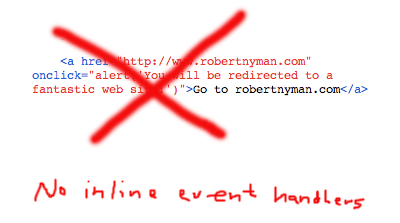
First, you never want to apply event handlers inline. Period. Second, normally you might want to apply several event handlers to the same event on an element without knowing (or needing to know) if there has already been assigned any, and also without overwriting any potential existing event handlers.
The solution for this was presented as far back as in 2001 by Scott Andrew LePera in his Crossbrowser DOM Scripting: Event Handlers, which uses the standard addEventListener method for web browsers who support it, and has a fallback for IE by using its proprietary attachEvent method. So far, so good.
The problem with Scott’s method, though, is that for IE you can’t use the this keyword in the function that receives the event. Normally, using the this keyword in a function regarding to an event should refer to the element the event occurred on. Unfortunately, in IE, it refers to the window object instead when using the attachEvent method.
Example code:
	var oElement = document.getElementById("my-div");
	// Note that the addEvent function referred to below is a custom function, not built-in
	addEvent(oElement, "click", handleClick);
	function handleClick(){
		// This code below will fail because of IE's incorrect reference for the "this" keyword
		var strElementId = this.getAttribute("id");
	}
This is most likely due to IE only having one global event object, as opposed to the standard model where events are local and passed with the function call (for a more detailed write-up, read Peter-Paul Koch’s Advanced event registration models article, and for a more real-life scenario, read his addEvent() considered harmful; both good reads).
A competition
Eventually all this led to a addEvent() recoding contest where a lot of people contributed and a winner was announced. After that, there were some voices raised about the winner and his solution, and JavaScript hero Dean Edwards (amongst many others) released his version of addEvent.
Aarons Moore’s addEvent
Recently I was approached by a student of the name Aaron Moore at the Gonzaga University, politely asking me to take a look at his version of event handling. His addEvent is based on direct assignment, i.e. element.onclick = functionToCall;, and does not rely on the addEventListener or the attachEvent one. The function is interesting for a number of reasons:
- Better web browser compatibility.
- It supports, naturally, multiple event handlers.
- It supports the
thiskeyword. - It allows for cancellation of default event behavior.
- It easily allows for making a script to see what event handlers are registered to an element.
- You can specify in what order event handlers should run.
However, it unfortunately lacks a way to specify capturing phase.
I’m going to be honest here and admit that I, due to lack of time, haven’t tested Aaron’s solution extensively, but I thought it was an interesting angle to the solution, and from what I’ve seen so far, it looks very clever too. Therefore, I encourage you to take a look it, test it and read the explanation to his approach. Please give him feedback and comments so he can find any eventual flaws.
There's one advantage of using inline event handlers.. is that they're avaliable right when element appeared in DOM tree.
Going other way you can assign event after all page is loaded or you need to use other combined way to get it faster..
It might be issue with large pages (that has content loaded partially).
So sometimes I use inline event handlers as it's simplier (I don't need to search for elements with javascript later) and quite rarely I'm assigning two different methods to one event,
medyk,
While I understand your position, what you're missing out on by using inline event handlers is, most likely, accessibility (it depends on what element you're applying the event to) and also that the user will have to load a lot of extra kilobytes for all those extra event handlers, as opposed to having all the events in a JavaScript file that will be cached by the web browser after the first visit to your page; i.e. unnecessary extra bandwidth usage.
Something that might address your concerns and apply JavaScript events as soon as possible to a web page is by not using the <code>window.onload</code> event, but instead by using the approach suggested by Dean Edwards: The window.onload Problem – Solved! and window.onload (again).
Hi, fellow javascript developers. If you wish to help with this project, I would be most grateful. Let me tell you what I’m most interested in.
Essentially, what I want boils down to 3 things: your opinion of the design itself, testing of browsers I can’t test, and testing of performance.
1) Opinions
I haven’t managed to get a single javascript developer to read through the code and give me an opinion of the design. Is this method as wonderful as I think it is? The quick explanation should be enough to make the code accessible. It is documented. The long explanation is comprehensive. Reading it should leave you with no questions.
2) Browsers
I don’t have easy access to a Mac. I believe that my functions will work on IE 5.5 on Mac, but I haven’t been able to test it yet. Any old browsers, or rare browsers which support javascript would be appreciated. If the table on the testing page does not already have an entry for a browser you have, I probably can’t test it. This is important to me because I want them to support all browsers that a person might want to do DHTML programming in.
3) Performance
After the addEvent contest on Quirksmode, some performance issues, such as ‘memory leaks,’ were brought up. I don’t have experience testing performance in javascript, but since I mean these functions to be as good as possible, I want them to be efficient in time and memory. If you have experience doing this kind of testing, I would love to hear from you.
Please, email me (two.a.ron [at] gmail [dot] com), or post comments on the explanation page.
Thanks again,
–Aaron
Honestly, why does support for capturing matter? So far as I know, Opera is the only modern browser that supports it. A big problem with the original <code>addEvent</code> (so far as there is an original) was that it included the capturing argument as a passthrough to the third argument of <code>addEventListener</code>–many people set it to true, and this resulted in inconsistencies between Firefox (which will pretend that capturing is false) and Opera caused confusion. And, of course, Internet Explorer doesn't even pretend to support capturing. Because of all of this, I can't see how capturing support can be included in a general event-handling solution. If you need capturing–and I can't think of why you would (any ideas?)–you should deal with cross-browser inconsistencies yourself. They're impossible to abstract.
Tom,
As far as I know, Gecko-based web browsers have supported capturing for a long time too.
But I agree with you. If you want to handle events consistently across web browsers, playing around with capturing isn't that interesting.
Aaron,
Good luck! 🙂
You may use Yahoo's excellent Event utility
See Dustin Diaz's Review
FlorentG,
I've seen it, and to be honest I haven't read all of the code for it. However, I don't want to be dependable on Yahoo's JavaScript libraries, I'm just looking for the most light-weight and easiest <code>addEvent</code>.
Robert,
like in other addEvent() scripts out there, there is an inconsistency that must be corrected to be able to make it work in a multi-window/multi-frame environment. The line that must be changed in Aaron Moore code is:
event = event | window.event;this assumes you only have one window and will only work if one attaches events to the same window containing the script. If one needs to attach events to other dynamically created windows or iframes that will not work.
I believe that something like this will work in Aaron Moore code:
event = event || (((this.ownerDocument || this.document || this).parentWindow || window).event);Also, see the latest Dean Edwards addEvent() source to see how this line has been modified to fit his code.
Diego
Diego,
Interesting. You're absolutley right. I never work in environments with frames so it didn't occurr to me.
hi,
i have a query relating to javascript attatchevent method i need to call a function when i close the window
so for that the code i used
maxWin.attachEvent("onunload", resetImageContent);
here maxWin is an variable and resetImageContent is
a method
my requirement is i have a maximize button when i select a
document such as text,pdf etc and press maximize button the
document should appear in a new window, when i close the
new window the resetImageContent method should execute
the issue is
when i select MSExcel/MSword document iam enable to run
resetImageContent method
those who will provide sufficient answer will be greatly appriciated.
venkat,
To my knowledge, when the <code>onunload</code> event occurs, it's not possible to tell if the window has actually been closed or just reloaded.
For Firefox you can use this:
object.addEventListener(string type, EventListener listener, boolean useCapture);
type: The Event type, without the "on". Example: 'click'
listener: The function that will handle the event.
useCapture: I'm not sure what this is, but according to w3 is states that if the user wishes to initiate capture.
Example:
<code>
<input type="button" id="btnTest" value="Click Me" />
<script type="text/javascript">
document.getElementById('btnTest').addEventListener('click', btnTest_Clicked, false);
document.getElementById('btnTest').attachEvent('onclick', btnTest_Clicked);
addEvent(document.getElementById('btnTest'), 'click', btnTest_Clicked);
function btnTest_Clicked(evt)
{
evt.target.value = 'You Have Clicked ME!!';
}
</script>
</code>
Dan,
Yes, it's mentioned in the post. The problem lies with IE and its own event handling, and how to get around that.
Hmm there was someone that had posted before me asking how to create events in firefox, that's why I have posted that. But I guess it got deleted.
Sorry for the mix up.
Dan,
No problem. 🙂
[…] preso da http://www.robertnyman.com/2006/08/3…vent-solution/ __________________ […]
There is a similar question/discussion on this Stack Overflow coders community for whoever could be ineterested.
Marco,
Thanks for the tip!