
Flash interaction disabled in Internet Explorer
Updated April 26th 2007
An alternative solution to this problem is my FlashReplace library.
Although news of this has been around for a while, many people seem to have missed it and/or didn’t think it was worth reading up on. On the contrary, the implications of this are huge and will most likely affect a lot of web sites. Due to the patent case with Eolas, Microsoft has been forced to update how ActiveX components behave in web pages.
This dreaded update, named Microsoft Security Advisory (912945), has been available for a couple of months, but on April 11 it will be forced out en masse through Windows Update so we have a few days till all hell breaks loose. If you want to test your web pages before that, you can download the patch and install it right now.
The gist of the patch is that no interaction with ActiveX elements will be initially allowed until the user has enabled the ActiveX by clicking it or tabbing to it and then pressing spacebar or enter. When hovering the ActiveX element the user is presented with a tool tip text that reads:
Click to activate and use this control
Examples:
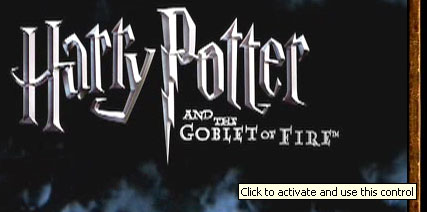

Naturally, no one wants your Flash movies, videos and the likes to be presented to the end user like that. “Luckily”, there’s a fix for it, which I guess is because of some kind of glitch in the patent. If you create the ActiveX object, in most cases this means an object tag, through script, then you will bypass this security warning.
There’s an article on MSDN, Activating ActiveX Controls, which describes different techniques doing this. Noteworthy is that it won’t work with inline scripts in the web page, only external ones.
Updated April 6th
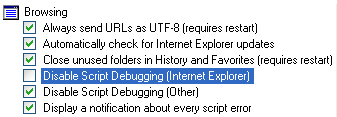
Tanny pointed out a serious problem when it comes to JavaScript solution; something I’d read about but hadn’t tested properly. If Disable Script Debugging is disabled in IE (the checkbox is unchecked), the script workaround won’t function either. However, I think the default setting in IE is that this is enabled, so it will hopefully not affect a majority of the end users. You find that option under:
Tools > Internet Options > Advanced, under Browsing.
What I think of this
I don’t know any deeper details of the patent case, but I think the whole idea of this sounds ridiculous. My general opinions/fears are:
- Using Flash or video in your web pages shouldn’t, in my opinion, be dependant on if script is available/enabled.
- There will be so many cases of poor JavaScript practices trying to add content to a web page.
- I’ve done some testing and ran into problems in IE when adding
paramelements to anobjectusing DOM methods. Instead, writing out the same HTML code by using theinnerHTMLproperty worked… 😐 - With this, XHTML web pages served as
application/xhtml+xmlwill probably never see the light of day, since a lot of web pages will now depend on code likedocument.writeandinnerHTML(Note:innerHTMLdoes indeed work in Firefox when the XHTML code is served asapplication/xhtml+xml). - What happens if/when Microsoft manages to appeal this decision and win in court? Should we all then change the code again?
If this sounds like too much to you and you want a library/tool to do all this for you when it comes to using Flash, you can take a look at FlashObject (although unfortunately it relies on innerHTML to render the content).
How to uninstall the update
As life on the web goes, many web developers won’t be aware of this, which will result in that you, as an end user, will have to allow every ActiveX movie you see. The solution to this is to uninstall the patch (thanks to City Of Rain for the heads up.):
- Go to the Control Panel
- Choose Add or Remove Programs
- Check the Show Updates box
- Find Update for Windows XP (KB912945) and choose Remove

So, whatever you do, please read up on this. It will affect you, as a web developer, end user or when supporting your grandfather’s computer usage…
No worries. Hopefully there's a sensible fix in the near future.
there is this method:
http://www.bobbyvandersluis.com/ufo/
rather complex/large method to add flash to HTML-XHTML pages
but these pantent wars in the US should be stopped since it affects the whole world.
I had read this a few times recently and hoped it was an April Fool that had somehow stuck around past it welcome, but no such luck…
Using script to launch Flash means we're now relying on two dependencies before the page displays as intended… Partly for that reason I'd always avoided FlashObject since the Object element itself allows fallback content which to date, has sufficed for me.
What happens on Flash only sites??? Not a lot I guess 😀
I use sFIR for headings. That was the only way I could use the font that the Intranet/Internet Compliance and Standards group said that I had to use on web sites that have dynamically created headings.
I have found a problem even with the script method on my computer at work. If you don't have the "Disable Script Debugging (Internet Explorer)" checked, you will still get the error. Vista does not seem to have the problem and my Windows Media computer at home does not have the problem, but XP Professional at work does have the problem.
On hover I get a box around the object and a tool tip message that says "Click to activate and use this control".
This is just ridiculous. I haven't investigated exactly what the patent claims, but it shouldn't make any difference whatsoever whether the object element is within the the markup or created with document.write, .innerHTML or other DOM methods.
I'd like to know, with regard to embedding external applications which is what the patent is about, what difference it makes how the markup is created/parsed and why the stupid twit at eolas wants to punish millions of web user's, developers and software vendors, by using an invalid patent that he has no right to hold. I'm also waiting to see when this decision will adversely affect other browsers.
I'm actually delighted to know that less Flash crap will be allowed to fly at users' faces.
As for application/xhtml+xml MSIE has not hinted at ever supporting it, even in IE8, and one thing's for sure: IE7 won't support it at all. So XHTML web pages served as application/xhtml+xml are not even on the IE radar anyway.
But of course I will be affected as my clients do love having Flash crap fly at their customers' faces…
@Lachlan
I would venture that it's a bug or an oversight (a momentary one?) that makes this bypass possible. It really makes no sense having either method work.
CityOfRain,
I sure hope so… 😐
Johan,
Yep, that's another way of doing it.
Yes, this one just sounds like a really bad joke…
Steve,
No, no such luck! 🙂
Probably not. I think there will be an outrage from users and web developers alike when they realize the magnitude of this.
Tanny,
Thank you for reminding me of that very important information! I've updated the post to reflect it.
Also, I mused a little about my thoughts on sIFR quite some time ago, if you're interested.
Lachlan,
I couldn't agree with you more. Interesting perspective about other web browsers. The way I understand it, they shouldn't be affected at all. Or maybe I've missed something?
Sébastien,
Yes, I've heard that opinion from a lot of other people too; people feed up with crappy Flash-based web sites. 🙂
And yeah, I know about IE and <code>application/xhtml+xml</code>, but this just feels like yet another nail in the coffin for that MIME type…
Most likely.
@Lachlan
I believe Eolas launched their patent case as a misguided attempt to aid other open-source and niche browsers in their fight against the mighty Internet Explorer. I think they granted open-source browsers some sort of "automatic license" or something, so they shouldn't be affected.
Olly,
If that's true, it's very interesting. But still, for the good of the web, I don't think it's a good move.
I have a few comments in response to some things here:
"although unfortunately it relies on innerHTML to render the content"
Unfortunately it's the only option – using the DOM to create object tags behaves *very* differently in various browsers. sIFR uses the DOM to create them, but also relys in innerHTML because of some Safari bugs.
In response to Steve's comment:
"Using script to launch Flash means we’re now relying on two dependencies before the page displays as intended… Partly for that reason I’d always avoided FlashObject since the Object element itself allows fallback content which to date, has sufficed for me."
Javascript is by far the best option for embedding Flash. While it may seem like an extra dependancy, it actually adds a level of usability to your Flash sites – providing alternate content while staying accessible to screen readers and being very friendly to Google when used the right way. Not to mention if you want to use the ExpressInstall feature you *must* use Javascript.
If you read the FlashObject page you'll see why I arrived at using Javascript and why it's the best option when you are embedding Flash movies.
Olly, if that were true, how do you explain Opera getting away with it, because Opera isn't open source? If anything, I think the twit at eolas simply has a vendetta againts Microsoft. Plus, the open source community were actually siding with Microsoft in this matter and if he thought he wanted to do a favour for them, he'd have dropped the case.
There is at least some good news. Patents don't last forever, it's only 20 years from the filing date (according to wikipedia) and since it was filed in 1994 (I think), it should expire in around 8 years.
Geoff,
Thanks for reading!
Regarding <code>innerHTML</code>: after doing some more extensive testing, I can only concur. It seems to be the most stable and consistent solution across web browsers and platforms.
But won't you accomplish the same things with having alternate fallback HTML content within your <code>object</code> tag?
Lachlan,
Oh, only 8 years? Joy! 😉
I have not been able to duplicate this behavior with the patch installed yet. I'm on XP Pro at work. Even the Harry Potter website worked without interruption. Maybe it's already been fixed on that site? Does anyone know of a someplace where this behavior can be tested consistently?
My second thought is that perhaps the patch was not actually applied. It appears in "Add/Remove Programs" as KB912945 though. Is there a way to tell for sure that the patch was actually applied to IE?
Shane,
Not sure about if the Harry Potter web site has been fixed or not, I don't have that patch applied where I'm sitting right now. But one other factor is that you have to have SP 2 installed as well; maybe that's the problem?
Rob,
Yes, SP2 is installed so that's not it. I guess I'll keep digging.
Okay, just to check in with people, having built the test case, Bobby's UFO works beautifully for this. We're working on getting the code finalized for the rollout at Gaia. You can locate his code at http://www.bobbyvandersluis.com/ufo/ (CC-GPL).
For sites which depend on rollovers before basic click-interaction occurs, this is quite the hurdle to overcome.
Shane,
Ah, sorry, then I have no idea what the problem might be.
Jakob,
Ah, interesting to hear what path you chose! 🙂
At the moment I've got something like this at the top of the pages containing Flash or other 'objects'.
<code><!–[if IE]>
<script defer="defer" src="iefixes.js" type="text/javascript"></script>
<![endif]–></code>
And in 'iefixes.js'
<code>var objects = document.getElementsByTagName( 'object' );
for ( var i = 0; i < objects.length; i++ )
objects[ i ].outerHTML = objects[ i ].outerHTML;</code>
Two key points are the conditional comment (so it's IE only) and the "defer" attribute (so it runs directly after the body is loaded).
It's not perfect but it works well, and means I don't have to change all object tags.
Karl,
That seems like a good approach. I have also kept the <code>object</code> tag in my pages but instead I use object detection in the script to check for ActiveXObject support to only replace it in IE.
[…] bacle that began this week with Internet Explorer? No? You should probably take a look at this post. Because I spotted that, we’ve already st […]
There are many solutions to this, and I found them to be honest rather complex. I read something on a quick fix at Click to activate and use this control link which is just one line of .js code + an external .js file. Still working on it though!
andy,
Well, I guess it depends. Some of them are really complex.
I did work for a client's website, where they have Flash, movies and Java applets. Each thing required a different approach, due to inconsistent behavior in IE. So I guess the only real solution is to test and adapt your solution to each specific usage.
When using Macromedia's (oops, Adobe's) recommended Javascript fix, all of the Flash disappears in Dreamweaver Design View. Now THAT'S a disaster.
Andy's quick fix above doesn't seem to work for me. I'll keep trying it though.
I take that last part back. Duh. I didn't have the include file path right. (smacks side of head).
Brian,
Ah! 🙂
If it hadn'tworked, it would've been very weird. I'm fairly sure they'd test with their own products first.
Here's an easy, 4 step fix tutorial using flashObject:
http://cityofrain.com/?page_id=592
Mat,
Nice, thanks for sharing!
Karl,
Thanks for sharing!
I've tried several different solutions by MS and Adobe, but yours was the quickest and easiest resolution I've found by far.
A quick and good fix can be found at
http://www.mix-fx.com/flash-prompt.htm
Nothing to complicated .js files can be downloaded, so all that's left to copy and paste one line of cod ein your html page.
bert,
Thanks for the link!
[…] ttp://blog.deconcept.com/flashobject/ http://www.kirupa.com/developer/flash8/flash_fix.htm http://www.robertnyman.com/2006/04/05/flash-int […]
from the Eolas Website
"Vision
To create and develop the inventions that allow information technologies to enhance the quality of life for everyone."
enhance the quality of life…hmm???
Pete,
Good quote! 🙂
Hello – I have implemented Bert's solution and it works great, except it sometimes causes my pages not to load completely, making the "onload" event to never fire (disabling my navigation roll-overs!) Does anyone know why this will cause the page not to fully load? It works, but then if you navigate to another page and hit "back" it will not load fully. If you then hit "refresh" it works again. I have tried to add the "defer" attribute, but then the page NEVER fully loaded. Thank you for your help and advice!
donna,
Well, if the <code>onload</code> event isn't hijacked by the script, I'm not sure what the problem might be.
Also, don't know if this is related to that problem, but I experienced a bug in IE when the cache setting was set to Automatically.
What was needed was to set a variable after the Flash scripting was done to force the window to re-render the content:
<code>var intBodyWidth = document.body.offsetWidth;</code>
Maybe it helps in your case too.
Say hello
info@eolas.com
WhatDaFuck with Microsoft on IE 7 is disabled JavaScript Protocol Grrrr :@ i cant believe IE 7 will be end of the web interaction ( finish flash , finish JS )
my minimalist approach can be found here: markus.dresch.com
the javascript to write the object tag HAS to be in an external *.js file but can use simple document.write functions.
Markus,
Thanks for sharing. However, personally I'm not a big fan of using a <code>document.write</code> approach.
too low level? 😉
document.write definately is faster compared to creating elements/objects but in this case speed doesn't matter as it's only a few lines.
but it's not only that, my generated html works fine in all browsers without doing too complicated (and non-standard) markup.
an option i thought about would be to include non-standard markup like <flash src="" width="" height"" /> and then replace it using javascript document.onload to get rid of the inline javascript (i prefer separating html from css from javascript).
thinking about XHTML as eXtensible, this would maybe even be justifyable semantically.
I found that using flash satay caused a problem when overwriting the html.
Removing the data attribute seems to solve the problem:
<code>
var objectElements = document.getElementsByTagName("OBJECT");
for (var i = 0; i
David,
If you are to write HTML code in the comment, you need to escape < with < and > with >.
ok, will do.
…ahem, removing the data attribute seems to solve the problem:
<code>
var objectElements = document.getElementsByTagName("OBJECT");
for (var i = 0; i < objectElements.length; i++) {
if (objectElements[i].getAttribute("data")) objectElements[i].removeAttribute("data");
objectElements[i].outerHTML = objectElements[i].outerHTML;
objectElements[i].style.visibility = "visible";
}
</code>
I've also used this hack to prevent the flickering effect caused by the object loading then being replaced:
<code>
<!–[if IE]>
<style type="text/css" media="all">
@import url("/SportingIndexWeb/css/ieObjectHack.css");
</style>
<![endif]–>
</code>
And this line makes the object visible again after the hack has run:
<code>
objectElements[i].style.visibility = "visible";
</code>
Markus,
Not that bothered about low level, but that a script block has to be put at an exact location in the code in every page. I prefer findingthe <code>object</code> element/-s through complete unobtrusive JavaScript and then replace it with <code>innerHTML</code>.
But hey, this whole situation is ridiculous to begin with, so whatever works for you, go with it! 🙂
David,
Hmm, interesting. At times IE is truly a weird web browser when it comes to its behavior.
Thanks for sharing!
Hello,
Try my solution to activate objects in Html pages.
Download: http://www.orontesprojects.com/activeobj
Version 1.03 works with:
* flash
* shockwave
* quicktime
* realplayer
* mediaplayer
Simple enter the input & output directory's and press convert. Object Activator does all the work for you …
Orontes
Orontes,
Thank you for your comment. I changed your link since I won't have any links from my web page directly to an executable file.
Me personally, I think using an executable file is overdoing it; it's better to show people the proper way of coding it or giving them the JavaScript code to accomplish it. However, if this helps anyone, I'm glad for their sake.
I found this discussion quite helpful, BUT, I originally implemented the document.write solution proposed by Adobe, but found that buttons i defined in javascript to perform a zoom or stop failed to work. I then implemented the amarasoft fix mentioned by andy crosack about and found that my page worked great in IE and Safari as expected, but then found that the buttons in Firefox no longer functioned.
Can anyone shed some light on this one?
Look at http://www.visinno.com/chad/diningroom1.html to see what is happening in Firefox.
Thanks!
mitch,
The thing with <code>outerHTML</code> in andy's example is that it's only supported in IE (and apparently by some Safari version as well).
My suggestion is to only run that script for IE and not for any other web browser. You can easily do this by wrapping the script wih object detection, like this:
<code>if(document.all && typeof window.ActiveXObject != "undefined){</code>
and so on…
Robert,
I agree with you that it's good to show people the proper way of coding it.
But if you have a lot of pages to convert, Object Activator can save a lot of time…
Also it will take time for developers of web-design software to bring out updates for this. With Object Activator, people can use their current web-design software.
There are also a lot of people that build sites, without knowlegde of html or java…
Orontes
Orontes,
Well, like I said, if it helps anyone, I'm glad for their sake. 🙂
That's a completely different issue. In my opinion, if you build web sites but don't know HTML or JavaScript (I take it that java in your comment meant JavaScript?), you seriously need to learn how to do your job.
[…] ; Google Clandar Wieder da! » Softwarepatente sind Scheiße. Manche Sachen versteht man einfach nicht. Es ist Microsof […]
function axblast(id) {
/*
Embedded Objects Active X Warning Remover for IE
A dutch work arround
Use: put your embed code (flash,movie, etc)
between a div tag with an id.
trigger the axblast(your_div_id);
*/
if (id == undefined) { return false; }
// Rewrite code for IE browsers only
// Get the object HTML from div
if (document.all && document.all[''+id+'']) { html = document.all[''+id+''].innerHTML; }
// Write the same HTML back – couldnt be easier (-.0)
if (document.all && document.all[''+id+'']) { document.all[''+id+''].innerHTML = html; }
}
Just spent a few hours fixing my "fix" for the "Click to
activate…" thing with IE.
It turns out that the "flashvars" parameter, and many others, don't
survive the "rewrite" in the fix I posted before.
Here's the new code:
At the top of the HTML pages containing Flash or other 'objects':
<code><!–[if IE]>
<script defer="defer" src="iefixes.js" type="text/javascript"></script>
<![endif]–></code>
And in 'iefixes.js':
<code>var objects = document.getElementsByTagName( 'object' );
for ( var i = 0; i < objects.length; i++ ) {
var obj = objects[ i ];
var clone = obj.cloneNode( true );
var parent = obj.parentNode;
var sibling = obj.nextSibling;
parent.removeChild( obj );
parent.insertBefore( clone, sibling );
clone.outerHTML = clone.outerHTML;
}</code>
Not as "clean" as before but then again it's a fix for IE, so it's
almost to be expected.
Another PHP functionat that automatically creates the nasty JavaScript necessary to display Flash without those ugly boxes:
http://www.mediajolt.com/blog-2.php
You use it like so:
dispFlash("myfile.swf", "250", "50");
workarround, Karl, Tim,
Thanks for your contributions.
The Beta 3 IE 7 does no effect with the lastest Flash Player / Shockwave standalone setup installation.
But just installed to my Opera and Firefox.
Mant,
Interesting! Thanks for sharing!
Hi all,
I need HELP!
We finally just released our new site, http://www.kbteachers.com
We use the JS solution, which has solved the "click to activate" issue…
It all works great in IE 6, Firefox etc….and then…off course…here comes IE 7 to ruin my day…
Apparently even actions INSIDE my flash movies are not working..!!!!
Can anybody give me some tags that I could just stick in the head of my HTML pages or somewhere ? so that it's an "easy" fix??
THANK YOU FOR ANY HELP!!!
email me if u have a solution : christophe at kbears.com
Christophe,
Just to let you know that I haven't got any idea about that behavior.
Hi again all,
OK, I found something that works, BUT…it only works if you do not have pre-loaders in Flash…weird…maybe someone can work it out?
Anyhow, here is the code:
(it's two pieces)
1) In your HTML, where your normal tags are, you go to the last embedded object in your page (we, for example, use three flash movies on 1 page)
So at the last you add:
Where flash1.js is a javascript file (you can create it using any text editor, and then saving the file as a .js)
that contains the following three lines:
theObjects = document.getElementsByTagName("object");
for (var i = 0; i
Oops….something did not show up:
at the last /embed> tag… you add this line:
script type="text/javascript" src="http://www.kbparents.com/flash1.js">/script
with the correct scripting off course…seems this post system won't let me put symbols…
Christophe,
Thanks for sharing.
You need to escape < with < when writing them in a comment.
Fix for both Opera and MSIE!
Put these two funtctions, included the call to addEvent at the bottom, in an EXTERNAL file and include the following line in any html-file. NB! Function MUST be in an external file!
<script type="text/javascript" src="fix_eolas.js"></script>
// EXTERNAL file start: —————————————————
// fix_eloas.js by Frode Rustoy.
// By Frode Rustoy. http://www.vevemsteren.no/
// Inspired by http://www.sitepoint.com/article/activex-activati…
function fix_eolas(){
var objects = document.getElementsByTagName("object");
for (var i = 0; i < objects.length; i++) {
var o = objects[i];
var h = o.outerHTML;
var params = "";
// Need to take care of each node because IE strips out Flashvars
// if you just copy the object
for (var j = 0; j<o.childNodes.length; j++) {
var p = o.childNodes[j];
if (p.tagName == "PARAM"){
params += p.outerHTML;
}
}
var tag = h.split(">")[0] + ">";
var newObject = tag + params + o.innerHTML + " </object>";
objects[i].outerHTML = newObject;
}
}
function addEvent(obj, evType, fn){
if (obj.addEventListener){
obj.addEventListener(evType, fn, false);
return true;
}
else if (obj.attachEvent){
var r = obj.attachEvent("on"+evType, fn);
return r;
}
else {
return false;
}
}
addEvent(window, 'load',fix_eolas);
// EXTERNAL file ends: —————————————————-
Frode,
Thanks for the code!
[…] it is required to play the new Flash video format. Secondly, it gets around the nasty new multimedia impediment in Internet Explorer versions 6 and […]
[…] tegen. Bekijk ze zelf ook even, dan weet je hoe het op te lossen valt. Links: 1. SwfObject 2. ActiveX zodra ik meer vind zullen zij d […]
My solution here still works with IE7
Workaround for ‘Click to activate and use this control’ with javascript
Hi again all..I was just wondering..
As I mentioned before, The JS method works great on most of my sites: http://www.kbteachers.com and http://www.kbparents.com
HOWEVER! We now have a really weird problem:
On our most popular site (for kids — I must warn you guys who will critisize the "whole in flash thing"– because these swf use pre-loaders the JS method does not work at all…instead, it seems to think (the browser that is–) that the SWF is only the size of the first level (where my pre-loader is) and therefore always resets the swf…not allowing the "gotoandPlay" to work…Makes sense?
Has anyone else experienced this?
If needed, I will provide the FLA and HTML ….but I really am wondering if I am the only one who has not been able to implement the JS solution…and by the way..it works on my other sites, both on IE 7x and FFox…so obviously it seems to be a prob with my swf..?
But i can't figure it out..and do not want to part with my pre-loaders…unless someone has the kindness of sending me an FLA with a loader that works….my standard one just doesn't… 🙁
THANK YOU FOR ANY HELP!
and if you can help us build http://www.kbteachers.com, or have some ideas how we can improve it —ps email me christophe [@] kbears.com
THANKS AGAIN.
I made a nice little site called HTML2SWFObject that will help you convert all your old <embed> / <object> code to the ultra-fast and compatible SWFObject code.
As per my previous post .. re the weird behavior … I will share how we fixed it…(3 months later…)
1st, the issue:
On KBteachers, we use a multiple flash movies on each page, as well as a PHP "backbone"…Once in a while we were getting customer complaints about menus not working properly:
Mouse over effects worked fine, but no success when clicking.
A really strange behavior that started happening with both IE and Firefox updates…
And, I must say, a behavior hard to replicate…
2nd, the fix..
At 1st I thaught it might be in our code, in the fact that we were using too many Flash movies (up to 5 at times) etc…
and then "enlightenment":
When a page was called using:
http://www.kbteachers.com/etc..
Everything was working fine.
HOWEVER….when the page called did not contain the –often omitted– "www" in http://www. etc…
Things were getting messed up….
I had no idea why flash buttons stopped functioning properly because of the "www"….but at least I found the culprit…
The problem then became, how do I fix this without re-building all my link codes etc…
Using a simple Htaccess file, I created a "force" the url to include http://www…so that if a user simply typed: kbteacher.com in the address bar, it would automatically become http://www.kbteachers.com
Here is the code for those of you who might need it:
(place it in a file called "htaccess")
RewriteEngine On
RewriteCond %{HTTP_HOST} ^kbteachers.com$
RewriteRule ^(.*)$ http://www.kbteachers.com/$1 [R=301,L]
ErrorDocument 400 http://www.kbteachers.com
ErrorDocument 401 http://www.kbteachers.com
ErrorDocument 403 http://www.kbteachers.com
ErrorDocument 404 http://www.kbteachers.com
ErrorDocument 500 http://www.kbteachers.com
IndexIgnore *
I forgot where I found the source for this, so if you know who originally wrote this code (which I know was for other purposes) you can add the link 🙂
Also, I was just thinking, maybe there is a way to use the same htaccess file to force the activation of embedded objects???
–Any ideas?
I don't understand why the "www" thing bugged my Flash files, so I would appreciate it if anyone could give me an explanation…
Happy surfing and learning…
[…] o force IE into ignoring code intended for other browsers! Then, there is the issue of the changes made to the behaviour of ActiveX content in Internet E […]
[…] a Flash movie into a web page. It should also work fine with streamed movies and get us around the Eolas patent problem in IE. It basically just supports one parameter and one […]
[…] there is the issue of the changes made to the behaviour of ActiveX content in Internet Explorer, following the Eolas patent su…. In my case, it doesn’t really matter if you need to activate a control to view a video clip […]
Problem with JS workaround is dynamic data being sent to FlashVars are not kept upon object refresh. Data is not sent second time making it useless for workaround.
For Data Transfer with FlashVars this works perfect:
Do the following:
Create A tag containing the variable to be passed like so – var FlashVarsSet = "rssMediaPath=&media_title=&media_link=&media_description=&media_date=&media_votes=&media_id=&media_channel=";
Then call the FlashVarsSet value from javascript include like so:
document.write('');
document.write('');
document.write('');
document.write('');
document.write('');
document.write('');
I am sure this will come in very handy for those of you that do a lot of dynamic flash content.
OK I HAVE THE SOLUTION
We had a nightmare with this as every computer in the company stopped playing flash and we are a video streaming company.
While Microsoft sort themselves out download this. It is actually the standalone flash installer from Macromedia. It works perfectly.
Download it from:
<a href="http://www.macromedia.com/go/full_flashplayer_win_ie"
http://www.macromedia.com/go/full_flashplayer_win…
Now will someone please get Microsoft to sort themselves out. No one really cares about the legal battles but we do care about watching flash.
Chris
does any one know of a decent flash to html converter too?
It worked! Thanks Chris…
This article could also help: Flash IE7 Fix
Hi
I'm fairly new to web design but spent a long week getting to grips with flash and produced a great looking menu……only to find the links did not work in Internet Explorer when the buttons were pressed. I searched the net for a solution but could not find one simple enough for me to use effectively.
However I have found that if you use dreamweaver you can select the flash button in design view and in behaviours set it as "on focus" adn "go to URL" this works fine apart from allowing you to use the back button but this is easily resolved with a good menu system.
Hope this helps anyone who was pulling there hair out like me!
I’ve installed the patch and see no evidence whatsoever that standard flash ads are disabled in any way. From my understanding of the MSDN article on this issue, it only affects things that require an Active X control, and flash banners do not unless they are doing something out of the ordinary. If you actually have evidence of a site with a flash ad that does not work, please let us know.
I bet situations like this are the major cause of the spread of usage of Firefox and Chrome from internet explorer.