
Windows user? Do the MSCONFIG dance!
Does your PC feel sluggish? It takes forever to start? It hogs memory like nothing you’ve ever seen but you have no clue to why? Let me give you a little tip: take a look in MSCONFIG (simply press Start > Run and type in “MSCONFIG”, or look at the How to use MSCONFIG guide).
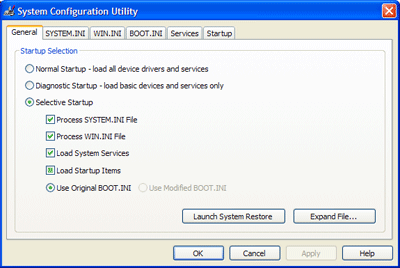
The part I want you to focus on in that dialog is the Startup tab. Click on it and you will find all programs and process that are run when Windows loads, even though you most likely couldn’t locate them in the Startup folder or each individual program’s settings. I strongly advise you to go through every item you find there and make sure it’s needed by you and/or Windows in your everyday work.
I decided to do this last weekend, just because my home laptop was a little slow and because I have no life (at least not when my daughter is sleeping and my girlfriend isn’t at home). Besides all the totally unnecessary processes I found there, to my horror I found a Trojan/>Backdoor. Being a Windows user, I naturally have a firewall as well as continuously updated antivirus program. I run Windows Update frequently and I use Firefox as my main web browser, so people shouldn’t be able to get to me through an IE glitch.
So how did this happen? I have no idea. How long has it been there? Clueless. But very very annoying and frightening. I want to be able to use a computer connected to the Internet without having to keep it in an atom bomb-proof safe… 🙁
So, the tip of today is:
Do the MSCONFIG dance!
It is possible you downloaded a program, that contained a search bar with the installation package and it edited the registry values even if you chose not to install the ‘search bar’ or so-called ‘enhanced feature’. I doubt it was Rootkit stuff.
Robert W,
I really have no idea… 😐
Hi Robert,
I can recommend the use of a program like Spybot S&D or Lavascoft Adaware.
These programs are cleaning your PC from stuff you don't want but wich are no viruses…
Robert, that is indeed a very useful tip which every Windows user should apply now and then.
I would even recommend to also go to the second-to-last tab "Services" and click something like "Do not show MS services" (I can't tell exactly because right now, I'm working on Linux). When this checkbox is ticked, you can – without any problems – deactivate all remaining items.
And besides: I do that almost always after the installation of a program, because most of them automatically add some stupid nonsense into autostart. I can only recommend that – even if it can be a bit annoying it is a good possibility to avoid security problems and slowdowns of your computer.
Chris,
I haven't tried Spybot S&D, but I do use LavaSoft's Adaware from time to time. Mostly, it's good for finding tracking cookies.
SilentWarrior,
Thanks for the good tip! I'm sure that will help a lot of people too. However, I just get depressed by all the security hazards there seem to be… 🙁
Since you're using Firefox and want to get rid of the tracking cookies you should take a look at the Cookiculler extension. With it you can lock some of the cookies you want to keep between the sessions and delete all other cookies on every startup of the browser.
Perfect way to get rid of all the cookie crunches that litter the web.
Patrick,
Very nice! Thanks!
My laptop at home is extremely slow. It takes about 6 to 8 minutes just to get it to boot, which is why I have resolved to hibernation. Sometimes I use Bootvis to get a better understanding of the places I am losing time.
Jeroen,
I'm sorry to hear that. Thanks for the link!
The question we should ask; are you the sole user of that laptop/network, or do other people you know use it/login occasionally?
It is possible that Spyware detector brand missed the thing or it was introduced onto the network via another network user, process, program, or person.
Typically you are most at risk from installing programs with “added featuresâ€Â. As you say Firefox will eliminate risk of most rogue code that is embedded within websites.
You’ll also have locked down Telnet and such I'd expect via the Firewall, without knowing your 'web habits' it's a bit hard to say. Obviously try running another Spyware scanner occasionally.
Great tip and one of the woes of windows. Whenever I switch my wintel box on, it spends a few minutes doing its 'dance of the antivirals/spywares' – most frustrating. I've resorted to switching it on and making a coffee or whatever…
Sounds like you need an intel mac 😉
Apparently, the xp emulator ware *will* be much more usable running off an intel base and remain OSX secure 🙂
Nice comment preview btw!
Robert W,
Not really the sole user, but definitely the only one installing things on it. It can be something I've installed, no idea, but then again I can't really promise for sure that there haven't been a single moment of being online without firewall or antivirus…
Either way, from now on I will be extra careful.
Steve,
Thank you!
I guess I do! 🙂
Hi I just recently recived a computer from a friend of mine and he didnt happen to tell me that its filled with these add pop ups they constantly pop up like 3-6 at a time and its slowing this computer down majorly. this computer is a windows xp home edition. I have no clue on how to fix this computer can you help in any way?
Don,
It could be anything. I'd recommend you to download something like Lavasoft's Ad-Aware to find and remove such malicious things.
[…] eblog
Monday, January 30, 2006
Windows user? Do the MSCONFIG dance!
Windows user? Do the MSCONFIG dance!
posted by John at 9:32 am & […]