Published on Tuesday, June 10th, 2008
Having developed a few Adobe AIR applications now (Memory, facedesk, GMDesk), and having talked to some people of the Adobe AIR Team, I thought it was time to express my feelings on what it’s like developing with Adobe AIR.
Continue reading
Published on Wednesday, June 4th, 2008
As I’m sure you know, I have a very strong interest in JavaScript, and what better way to try and feed that, than to read a brand new book by Douglas Crockford entitled JavaScript: The Good Parts!
Continue reading
Published on Monday, May 19th, 2008
A while ago I received a book which I had anticipated to have the chance to read: The Art & Science Of JavaScript.
Continue reading
Published on Friday, February 22nd, 2008
I’ve always liked watching movies, so in 2005, for the first time, I decided to watch all the movies nominated in the Best Motion Picture of the Year before the Oscar Academy Awards. Just to know what I think about the result, and whether they actually were good movies.
Continue reading
Published on Monday, January 21st, 2008
*SPOILER ALERT*. If you haven’t seen till episode 9 of season 3 of Prison Break, please don’t read this; it’ll spoil your fun.
Continue reading
Published on Wednesday, December 19th, 2007
Quite recently I finished reading the book AdvancEd DOM Scripting by Jeffrey Sambells, together with Aaron Gustafson.
Continue reading
Published on Wednesday, September 5th, 2007
I completely missed the train this spring when betas for Spotify were given to a very select few, but the other day my brother had seen the service and was blown away! He called me and told me about it, so I just had to check into it too.
Continue reading
Published on Monday, June 18th, 2007
It all started last summer. Everyone seemed to be talking about Ubuntu, so naturally I had to try it as well. I installed it, played around with it, and then, somehow, it just went away…
But now I’ve tried it thoroughly, and I like it a lot!
Continue reading
Published on Thursday, May 31st, 2007
Just playing around on the Internet, I’m finding out that Google has implemented yet another outstanding, supremely cool feature, this time for Google Maps. Now, you can get virtually explore neighborhoods at street-level virtually with Street View.
Continue reading
Published on Tuesday, May 29th, 2007
Yesterday, a gloomy and rainy day in Stockholm, and with the suburb train situation messed up, I felt generally depressed. How to feel better? With some humor and aggression, of course, and what better way to find that than watching Henry Rollins in Stockholm!
Continue reading
Published on Friday, May 18th, 2007
For some time, I was looking around for the best hard drive media player to plug into my TV, and I scoured the web and harassed my friends to get some good pointers. And, finally, I found just what I needed!
Continue reading
Published on Wednesday, May 9th, 2007
March 14 last year, Amazon launched Amazon Simple Storage Service (Amazon S3). At the time, you could only program against an API to use the service to transfer files, so I waited for a while, convinced that proper services would be offered. Now that day is here!
Continue reading
Published on Wednesday, April 18th, 2007
For some time now I’ve been beta-testing Joost, a TV service through the Internet, and it allows you to choose when to watch which program; basically, total control for the end user.
Continue reading
Published on Thursday, February 8th, 2007
Windows Vista is now finally released, and Microsoft are banging on their marketing drum, blowing their PR horn. I had the chance to try out a release candidate of it and have also seen some of the final version. I have to be honest and say that I haven’t tested it too much, so my view probably isn’t as balanced as it should be (therefore I won’t cover deeper functionality).
But from what I’ve seen, frankly, I’m not impressed.
Continue reading
Published on Tuesday, January 30th, 2007
For a time now, I’ve wanted to read an advanced book about JavaScript, to perhaps fill in the blanks, and to get some inspiration and different perspective on how to implement various features.
Therefore, after some consideration, I picked up Pro JavaScript Techniques by John Resig.
Continue reading
Published on Thursday, November 23rd, 2006
November 17th I went to see Iron Maiden play in the Globe arena in Stockholm. This was the first of four gigs in Sweden (three of them planned in Stockholm), concerts that sold out as soon as the tickets were released. I though I’d tell you a little about my history with Maiden and also what I though of Friday night.
Continue reading
Published on Wednesday, November 15th, 2006
I love taking and looking at photographs, but I am in no sense a professional photographer; rather the happy amateur! Therefore, I’m constantly on the look-out for better photo management and photo editing tools, making viewing and enhancing images better. As of lately, I’ve been taking Aperture and Adobe Photoshop Lightroom for some test drives.
The one I definitely prefer and regard in that “war” is definitely Adobe Photoshop Lightroom, and wanted to tell and show you some things about it.
Continue reading
Published on Friday, October 20th, 2006
When I wrote my post about the Flickr photo service, I promised that I’d review another one within the next week or so. Well, as we all know, time flies but now I’m ready to tell you about a service that I believe have a serious potential to become a Flickr contender.
This is Google’s picture service: Picasa Web Albums
Continue reading
Published on Sunday, October 8th, 2006
Season three of Lost has just begun, and episode one is outstanding! The first five minutes probably had me sitting with my jaw dropped, and the “reward” scene had me laughing out loud (don’t worry, there will be no more spoilers here)!
Let me try and speculate here why Lost is so good and what I think about its future.
Continue reading
Published on Thursday, August 24th, 2006
When I first heard about Flickr I liked the idea, but being the rebel I am, I was a bit reluctant to use it since everyone was hyping it so much. However, for those of you that haven’t noticed the little Flickr icon and link I’ve added to this web site: I now have a Flickr Pro account.
During this summer I decided to finally take the plunge, and this post is about what I think is good respectively not-so-good with Flickr.
Continue reading
Published on Wednesday, August 23rd, 2006
First and foremost, let me tell you that I don’t abide to the poor labeling of being a Mac fanatic or a Windows user. I’m a computer user, period. I use the programs and computers and programs that are good, no matter what their eventual name might be.
With that said, I hope this post will be balanced and fair instead of just trying to take sides, and informative no matter from what angle you’re coming.
Continue reading
Published on Thursday, April 20th, 2006
As all of our lives, or rather the services we use, become more and more web-based and moving away from being locked down to one specific computer, online storage capabilities is definitely a huge part of that transformation. Sure, one can drag an USB memory stick around or a MP 3 player with a hard drive etc, but I prefer just getting online and downloading things.
As of lately, I’ve been testing the Box.net service, which has a nice sleek interface and is easy on the eyes.
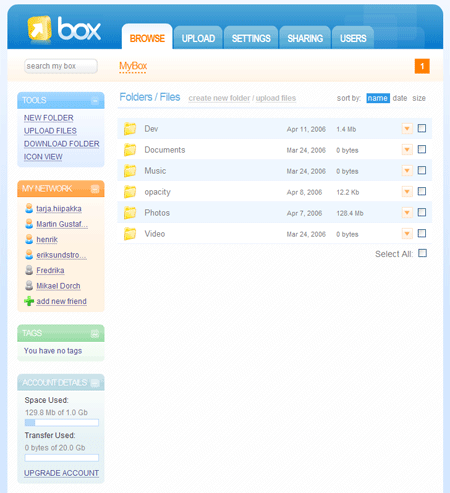
The general features are:
- 1 GB storage for free (with prices starting at $4.99 per month for 5GB)
- Private sharing
- Public sharing
- Desktop Sync software (upcoming)
- Work groups
Uploading
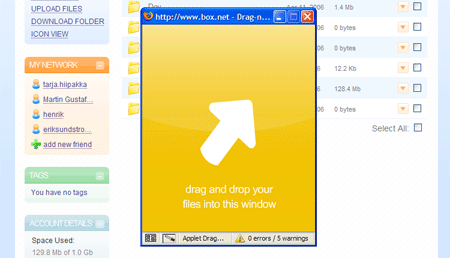
There are two basic ways to upload files: through Flash and through drag and drop, and since I’m a big fan of drag and drop, that’s the option I use.
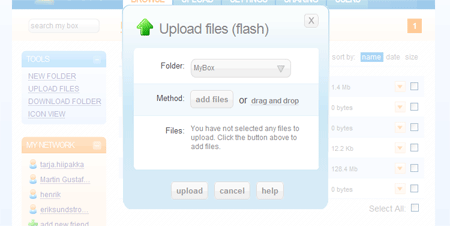
Flash upload dialog

Drag and drop upload dialog

Sharing
One great feature is sharing your files. You can either share them privately with other Box.net users or you can share them at a public URL for anyone to download, with optional password protection. Very handy, as opposed to e-mailing large files, sending them over IM or something similar.
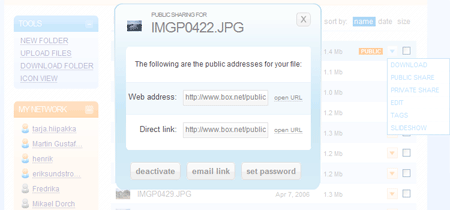
The Public sharing dialog

What I miss
I would love to have FTP access to my account, for easy and swift uploading. Sure, Desktop Sync might happen, but I’d like to have free access to my file structure and to use my FTP tool of choice.
Conclusively, I think Box.net is going places. They’re still working on some minor issues, but they’re also very humble and open for feedback, so just let them know if you have any questions.
Except from a good service, Goowy’s file sharing is based on the Box.net API and they have also become a module in Netvibes, so they seem get their share of attention.
The creators of Box.net also blog about the service and what’s going on in terms of competitors’ services, for anyone wanting to stay on top of things.
Go try it out now!
Published on Tuesday, April 18th, 2006
As of recently, I’ve had enough of trying to keep track of appointments and other assorted obligations. Fredrika writes things for hand in her little secret calendar, which means there’s no way I can stay on top of things going on or actually double-check when I’m not actually in the same room as here.
This led to me starting to look around for web-based calendar services, where one can enter data and it will be available from any computer at anytime, and also get reminders. Just as I was testing some services, Google were kind enough to apply to my needs and released Google Calendar.
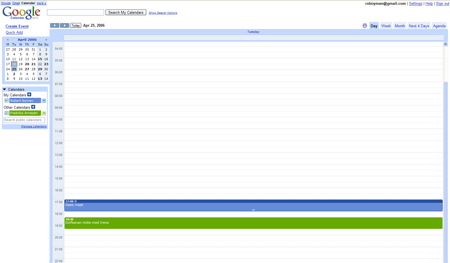
Google Calendar has got the look and feel of GMail and other Google applications and you can just start using it with your existing Google account.
Different views
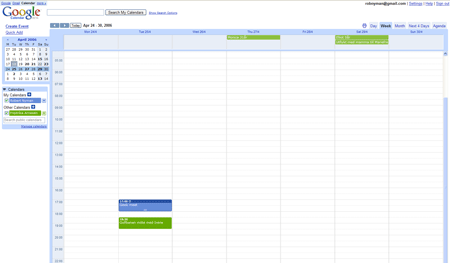
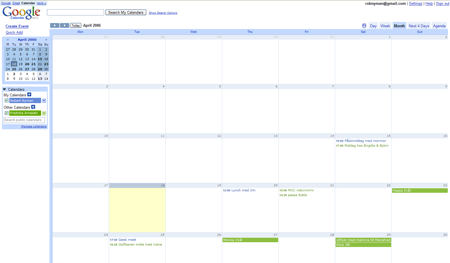
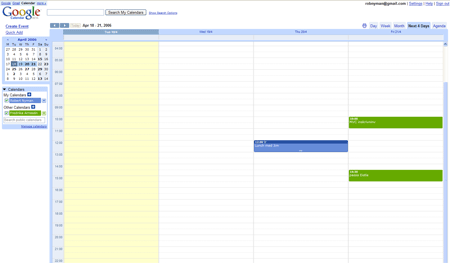
Google Calendar supports five different views:
- Day
-
- Week
-
- Month
-
- Next 4 Days
-
- Agenda
-
Creating events
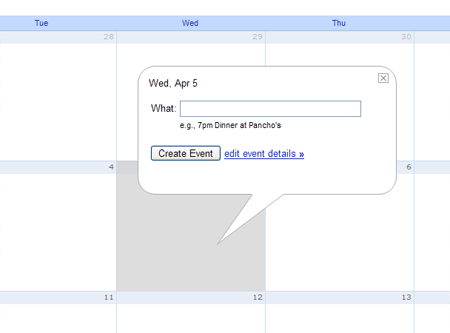
It is very easy to create an event: just click the desired date/time and enter a subject. You can then drag and drop existing events to move them to another date/time.
Notifications
It’s possible to get a notification through an alert box, e-mail or a SMS text message. I would love that last option, but it seems like it’s only available for US citizens.
Sharing
You can also share your calendar and events with others, which is a great thing! This lets you have your own calendar, share some or all events and then also color-code your and other calendars’ events to easy distinguish whose appointment it really is. Your calendar with the events labeled as public is made available at a public address, and there’s also a private address you can use in other calendar applications.
Missing features
I would love some way to synchronize the information with a PDA or cell phone and be able to use it offline.
All in all, a great service that is yet another step for me from being dependant on just one specific computer.
Published on Thursday, March 2nd, 2006
In December, after some serious thinking, I decided to get me a video iPod, the fifth generation of iPods. I already have a third generation iPod, but took some time to find arguments to convince me (and my dear Fredrika) that it was a good idea to get another iPod just one year and nine months after the first one.
How could I motivate this to myself? Well, there were some factors that pushed me over the brink:
- Being able to watch video
- I think the MPEG 4 format is awesome, and I love watching videos on it. To me, the screen size is just fine.
- The color screen
- Color is always nice, right?
- The design and size
- It looks oh-so-good, weighs practically nothing nowadays (4.8 ounces/136 grams) and is almost thin like a leaf.
- The price
- I got a 30 GB one, definitely sufficient for me, and it’s actually cheaper than most of its matching alternatives (not to mention that the alternatives usually weigh three times more and are five times as thick).
- Commuting
- I commute at least two hours a day (and if you meet me in real life, give me a hug and please tell me you share my pain) and watching videos is about the best way to kill time (perhaps for sex, but that isn’t really suitable on the suburb trains…).
I’ve also seen that there a number of porn movies available in iPod format. I sincerely don’t want to know what people are doing with an iPod in one hand and… shivers
Besides, if one would want to get off holding an iPod, the design of the iPod would be such a turn-on by itself.
A disturbance is that the software isn’t perfect, it has a tendency of sometimes freezing when the battery goes low and you’ve just watched a video. Just remember to hold down the Menu key and the Play key to soft reset it and you will be fine. Aside from that, I wish they would’ve thrown in an AC adapter. One doesn’t want to fire up the computer only to charge something through an USB port (and why does the computer have to be on for that?).
Conclusively, if you’re looking for a MP3 player with a nice hard drive, I most definitely recommend getting an iPod. I hesitated for a while, took the plunge, and haven’t regretted it for a single second!
If you don’t have movies in the MPEG 4 format, you can use free tools such as the Videora iPod Converter for Windows and iSquint for Mac to convert it.
Published on Monday, February 27th, 2006
A while ago I got an invitation to beta test the new social bookmarking service on the block: Ma.gnolia. I was interested in it from day one I heard about it, however back then I had no idea what it was about. My reason for being biased is that I love magnolia trees, Fredrika and I used to go look at a huge one in a park close to where we first lived together and I also recently got her two magnolia trees for her birthday.
First, let me outright say that I’ve never really found a need for a bookmarking service, my main need and interest lies in following feeds; instant information and then it’s gone. If there’s anything I have a great need for finding again, I search on the web using Google and mix of suitable keywords. Therefore, it’s interesting to see that Ma.gnolia’s slogan is:
Found is the New Search
I personally don’t think that it will ever happen; I and a lot of other people do constant searching on the web and in applications. I’m sure a good service can complement searching, but it will never replace it.

Features
The idea is to save all your bookmarks and have them available on the web from any place. It’s also about tagging your bookmarks and finding other people’s. So far, just like del.icio.us but looking a lot better. There are, however some features and here’s a list of them:
- Save bookmarks, publicly or privately
- Tag bookmarks
- Send bookmark to one or several of your contacts
- Send bookmark to one or several of your groups
- Find other people’s bookmarks
- Join special interest groups
- See your contact’s latest additions
- See your groups’ latest additions
The factors I find very appealing is the ability to join certain groups covering special topics, and to add a few key people to your contacts’ list that you know will add interesting bookmarks. The nice thing with contacts is that it doesn’t have to be a two-way relationship. You can have anyone as a contact without getting permission and anyone can add you as a contact.
They way I see it, there’s no downside with people adding you as a contact without your consensus, all they can see is your latest bookmarks. However, I guess in the long run it might be interesting with closed groups that require an invitation, or perhaps a “Make this bookmark only available to certain contacts”.
There are also different views in the Tags section where you can browse your tags, your contact’s top tags, your groups’ top tags and everyone’s top tags, and they can all be viewed in a tag cloud or in an A - Z listing.

The start page
During the beta period, the start page consisted of your, your contact’s and your groups’ latest bookmarks. A good initial view that unfortunately was replaced with a Ma.gnolia Hot Bookmarks and a Ma.gnolia Featured Linkers section after it was launched February 15th. The hot bookmarks are fine, but I would definitely prefer seeing my contact’s latest bookmarks as opposed to the featured linkers that I haven’t chosen nor is interested in. Now you have to go to the Bookmarks section to get the beta start page view. Also, once you’ve left the start page, the only way of getting back is clicking the logo. Perhaps a Home link should be added?

Other sections on the start page, in narrower right column, are Recent Bookmarks, Hot Groups and Hot Tags (and also Hot Bookmarks for other pages than the start page). All valid, but I really miss a listing of my tags. I gather most people will use this service as an archive for their bookmarks, nothing more, nothing less, so I think it’s a waste of an extra click to go the Tags section first.

Something that’s weird here, though, is that the start page just exclaims:
Welcome back
and then I go to the Bookmarks section that says:
Hello, Robert
Shouldn’t the start page be the most personal one?
Listings
Most bookmark listings contain three actions for every bookmark, with the addition of a fourth to easily switch your bookmarks between being private or public. The problem arises when I look at listing for a specific tag; then there’s no way to add it to your bookmarks and its name is linked to the URL itself. I missed it a couple of times, but the only way to add it is to choose the option View Details. I definitely feel an add functionality is missing there.
Another thing which I dislike is that the listing in the right column leads directly to the URL that the bookmark point to. I guess makes it easy to just go to that web page right away and see if it’s interesting, but there’s no way to add it from that list. Functionality I think should be added as soon as possible.
Another thing that would be nice to see right away in the listings is how popular a bookmark is, i.e. how many people have the same bookmark.
Design & code
The design is very nice with smooth and balanced colors. Default font size is good and it’s very easy to get a fast overview on what’s every page. Unfortunately, there’s a an ad space in the header, something that has to be there for revenue, most likely, but also something that ruins the cleanliness of the web site (it was so beautiful during the beta period :-)).
I also like the dimming of the entire web page when I want to delete something. Kind of hard to miss…

Another thing that looked good during the beta period was the state of the code, but now there seems to be some minor flaws in every page and also a few inline events. All-in-all, though, the code seems to be well-structured and semantic, so there’s definitely hope.
Gripes
The web site is, most of the time, fairly slow. This is disheartening since it’s a very nice service otherwise, and I really advise them to look into this as soon as possible. Soon the honeymoon period is over with the service being new, so it should be addressed right away. Also, for performance and small usability enhancements, dare I *GASP* suggest using some AJAX (Pssst! Look at ASK…)?
The issues with the listings are annoying but minor. I don’t think it would be a big deal to change that.
Conclusively, I’m not sure that I have the need for a bookmarking service. But if I ever will, Ma.gnolia would be my choice. The good news is that Ma.gnolia is publicly available now for everyone, so I urge you to go check it out!
Related reading
Published on Wednesday, February 1st, 2006
Microsoft has now publicly released IE 7 Beta 2 Preview, which you can download in their IE page. It is only available for Windows XP SP 2 as of now. Naturally, your favorite blogger (yeah, you know it’s true, just admit it! ;-)) has taken it out for a short test drive.

The good
- The interface
- It has a very nice and intuitive interface. I really like the rearrangement of menus and buttons; clean and sleek.
- The zoom feature
- Without a doubt, this is the best feature of this release! I wrote about my opinion about this in Web browser vendors are also responsible for accessibility and this is exactly what I’m looking for. The combination
Ctrl + scroll wheel or Ctrl + +/- now zooms a web page.
- Searching in the history
- They have added a Search History feature. Seems like a great idea, but for some reason it never worked for me.
- No more almighty
select elements
- It works positioning elements on top of
select elements so they don’t shine through. Finally!
XMLHTTPRequest support without ActiveX
XMLHTTPRequest now works even if ActiveX controls are disabled.
- Anti-aliased text.
- It looks like the text in the web browser now is automatically anti-aliased.
- Conditional comments support and consistency
-
Conditional comments are still supported and in a consistent way. You can use code like this to only include code in versions of IE prior to IE 7 (most likely CSS fixes):
<!--[if lt IE 7]>
<link rel="stylesheet" href="CSS/ie.css" type="text/css">
<![endif]-->
The bad
- No
min-width/max-width or min-height/max-height support
- This isn’t just bad but outright irritating! The incorrect handling of
width and height is behind many flawed layouts on the Internet, and to see that this still isn’t supported is outrageous!
- Lack of support for pseudo-classes
-
Pseudo-classes like
:hover, :focus, :after and :before have no support (except for, naturally, :hover on a elements). Microsoft claim that :hover should be supported on all CSS
elements (what the hell a CSS element is…?), but I couldn’t get it to work on any other element type.
- No resizing of fonts in pixels
- Resizing fonts specified in pixels still doesn’t work. To my knowledge, the only web browser on the market that doesn’t support it.
- Incorrect event model
- It still doesn’t support the correct DOM event model for scripting.
The terrible
I found something that shocked me when I tested this web site: no content was shown but the background color. After some research and testing, I found the error. I use an element for clearing floats that looks like this:
div.clear{
clear: both;
height: 1px;
margin-top: -1px;
overflow: hidden;
}
The result of this that everything vanished! I thought that maybe it had something to do with the margin-top or overflow property, but no. It was height: 1px that threw it off so much. And the thing is, no matter what height I set the element to, it didn’t work. I had to completely remove it, and then things worked just fine. Terrible!
Running side by side with IE 6?
Since it’s possible to run IE 5 and IE 6 side by side, I was hoping that this was also applicable to IE 6 and IE 7. I also read Matt Brett’s Running IE 7 Beta 2 and IE 6 on Windows XP post, but unfortunately it didn’t work.
I also got a really interesting dialog when I was trying to get the IE 6 stand-alone version to work:

Have you tested IE 7? What are your experiences and impressions?
Related links
Published on Thursday, January 19th, 2006
A while ago I read Garret Rogers’ post The personalization war, which in part inspired me to write this introduction to different personalized start pages. So what are those, really?
The main purpose of such a start page is for you to get a good and easy overview of a lot of things, including the feeds you follow. Different services also offer different gadgets that you can use, such as seeing your e-mail inbox. Naturally, one of the most useful parts of this is that you have access to the same start view and information wherever you are and whatever computer you are using.
The ones I’ve tested are:
- Google Personalized Home

- Netvibes

- Live/Start

- My Yahoo!

Most of them are, of course (sigh…), in a beta state, so I haven’t really taken that into my observations. I’ve tested them in different categories, and I name a winner for each and finally, a total winner. Live/Start is developed by Microsoft, but I’m not sure if Start will still be around and if they’re putting all their energy into Live now. Both are pretty much the same service right now, though.
Design
Google Personalized Home’s service looks pretty much like all of the other Google services, as opposed to Netvibes and Live/Start who have got very lean interfaces. Netvibes has also got a nice distinct background and borders around its parts to easier tell them apart. My Yahoo! offers a lot of themes, and each and every one of them almost makes me barf.
Winner: It’s a tie between Netvibes and Live/Start.
Usability
All of them, except My Yahoo!, rely heavily on an AJAX approach with drag and drop to position your different parts wherever you feel like. Netvibes and Live/Start also offers the possibility to expand and collapse different parts, where Netvibes also has links for expanding/collapsing all parts. Netvibes is the only one showing you a number of unread posts for each of your feeds.
Google Personalized Home and My Yahoo! only present direct links to the posts in your feeds, whereas Netvibes and Live/Start present the text for each feed when a link is clicked, together with the other posts for the same feed, and there you can choose to expand or collapse the text for all of the feed’s posts.
Netvibes and Live overlays a “page/window/layer (yeah, I’m sorry for that word :-))” that fills the entire web browser window when the links are clicked, as opposed to Start that just opens a small one. Start’s behavior is definitely the one of these I prefer.
Live/Start also offers small arrows after each post in a feed which is a direct link to the post in question. This would have been great, if they haven’t added the functionality to these links to automatically open a new window. Extremely annoying. This is 2006, ok? People want to choose themselves if they want to open a link in the same window, a new window or a new tab; don’t force a behavior on users. And if you’re so worried most users won’t get, just offer this as a setting then.
I wish Netvibes would also have these arrow links, but naturally not with the behavior mentioned above that Live/Start have. In the overlay that is opened up, Netvibes’ also dreadfully opens new windows when each direct link to another web page is clicked. Stop it! Now!
Settings-wise, Live/Start is the winner with offering you how many columns you want to use, from one up to four columns. My Yahoo! is the only other service offering this, with the choice of two or three columns. My wish is that all of them should really offer a way to see the text for each feed post in the same view when it’s clicked, and also to expand or collapse all posts for a certain feed or the entire web page. I also wish Netvibes would add a way to mark all posts for all feeds read.
Another thing that blows my top is that the sign in-link on Live for a long time didn’t work in Firefox. Then they fixed it, but apparently added some new update, so now it’s broken again. It’s just a link, dammit, how hard can it be? And the number of dead links and things of inconsistency one stumbles on while using My Yahoo! are too numerous to mention.
If it hadn’t been for Live/Start forcing me to use a Microsoft Passport account, I would’ve declared a tie between Live/Start (because of being able to choose what number of columns to have, and Start also for its nice reading window) and Netvibes (for its unread items feature). However, because of that, it tripped Live/Start at the finishing line.
Winner: Netvibes.
Accessibility
I turned off JavaScript, and not surprisingly, none of them had a full proper fallback. Netvibes and Live/Start didn’t even render any content nor give me a message saying that I had to have JavaScript enabled. Most of the links didn’t work either for Live/Start when tabbing to them and then pressing Enter. Google Personalized Home rendered the content fine but told me that I had to have JavaScript enabled, and has a text saying that it now works on mobile devices (I haven’t verified this). My Yahoo! kind of worked without JavaScript except for some parts.
Winner: My Yahoo!
Importing/exporting OPML
The most efficient way to use your feeds in different services is to have them categorized in an OPML file and then just import them. Netvibes and Live/Start offer importing as well as exporting of OPML files, although, for some, reason, Netvibes didn’t work correctly with my OPML file that seems to work fine for all the other services on the web. The problem was that I could indeed import the feeds but then the grouping went wrong so I could never see the content of any feed or add it to my page.
Google Personalized Home and My Yahoo don’t offer neither of these, which, to me, is shocking.
Winner: Live/Start, for working flawlessly with feeds.
Gadgetry
Google Personalized Home offers you seeing your GMail inbox (surprise), My Yahoo! offers you to see your Yahoo! Mail (another shocker) and Live offers you to see your Hotmail (yeah, I’m trembling with excitement now…). However, Live also has a number of other gadgets for you to use, where Netvibes seems to have the best ones. Netvibes have, amongst others:
- Mail (GMail, Yahoo! Mail or any other POP mail you want to add)
- Webnote
- To Do List
- Delicious
Winner: Netvibes.
Code quality
All of them have validation errors, but Netvibes seemed to be the only one that didn’t have well-formedness errors or invalid elements. Google Personalized Home and My Yahoo! didn’t even have a doctype. Semantically, they were all pretty poor…
Winner: Netvibes.
The winner is…
If you’ve mustered enough strength to read this far, you have probably guessed that it is: Netvibes. Overall, they offer the most stable, reliable, usable and customizable service. While it’s far from perfect, it’s definitely my pick of the pack. Are you using any of these, or some other personalized start page service? Let me know!
Related posts
Published on Thursday, January 12th, 2006
As of lately, I’ve been trying to move my program/service usage online more and more, to make it accessible from any computer and also not to lose information in case of a computer crash. Part of that has been finding a service to follow all the feeds I subscribe to. If you don’t know what a feed is, read Wikipedia’s Web feed definition.
So, deciding which ones to test, amongst other sources, I turned to the statistics for this web site to see what the people who are subscribing to my feeds are using. My conclusion was that the four that seemed most popular were:
The important thing to think of when using these kinds of services is that they should support importing and exporting of OPML files. Then you can just move your feeds from service to service and save them in a file for later reference, instead of entering all the feeds over and over again.
Don’t regard this as a professional review but rather just as a regular computer user testing them out. My impressions were:
Bloglines

From what I gathered, Bloglines seems to be the most popular service online and generally I think it’s ok to use, no more, no less. I don’t like the layout using frames, although I really have to give them credit for their excellent PDA version (the only serviced I’ve had the opportunity to test on a PDA). My preferred usage is to keep my read and unread posts together in the order they were posted by the author, together with an indication in the navigation of how many unread posts there are in that specific feed. Bloglines, as well as all the other services have that indication.
However, one thing that bothers me is that the read feeds disappear from the default view when I click on a feed. It is possible to retrieve them again, but that requires extra steps. An alternative to this is to use Clippings to save your favorite posts, but that’s not as interesting to me.
NewsGator

NewsGator is very similar to Bloglines but with a slightly more appealing layout. It implements the same things with removing read posts from the default view and having Clippings for favorites. The thing with NewsGator, though, is that the whole feed disappears from the left hand navigation, if it doesn’t contain any unread posts. Very annoying.
Google Reader

Google Reader has a default layout which is very sparse but good, and it displays only the latest updated posts. It also has support for keyboard shortcuts, of which I’m a real aficionado. But, as soon as you click the Your Subscriptions link, it takes up the entire top part of the web page.
I would really like to see a way to check posts feed by feed without losing so much space of the web page. Google Reader definitely has potential in my eyes, though.
Rojo

First, I love Rojo’s front page with the Most Read Stories and Recently Tagged Stories, it’s a great and simple way to see what’s talked about right now. Rojo has also taken a little different approach with tagging posts, something I really like and it makes it very easy to find mine and other people’s posts for a certain topic.
After that you have a number of ways to view your feeds, and the different options you make should stick. Unfortunately, expanded blocks in the Feeds tag view doesn’t seem to be consistent/stable when it comes to that, but otherwise it works fine. Overall, it does seem just a tad slow, though.
Conclusion
I didn’t really find any service that was perfect, but out of these I have to say that Rojo is my pick. One of the reasons for that was the updating frequency, the other services can lag behind up to half a day; I want my information instantly!
So now I use Rojo and another similar service that I will tell you more about another day. I do urge you to test these out; maybe one or several of them are spot on for you.
Are you already using any of the above, or some other service that you would like to tip me about? Let me know!
Published on Tuesday, January 10th, 2006
A while ago I was invited amongst a lot of other people to beta test the new service Newsvine. I know that the title of this post might imply pessimism, but it’s not meant like that; it’s a rhetorical question.
So, first, what is Newsvine? Basically, you have a number of options as a user. You can:
- Read articles collected from around the web
- Write your own blog
- Seed articles, i.e. have a list of links with description to news that you find interesting
Then you can either comment on a post/article, live chat about it or endorse it so it gets a higher ranking. You tag all your posts and articles, and you can search or browse pre-defined categories in a top menu of the web site, or through a search at the top where you can specify a certain tag to look for. You can also add authors or tags to a personal watchlist.
One of the things I miss as a user is a way to only search through the links I’ve tagged as, for instance, “technology”; as of now, if I click such a tag link, I get to see everyones’ posts and links with that tag. Sure, I guess they can implement a so-called tag cloud, but visually, to me they’re mostly annoying.
At first I had a hard time finding any usage for it; there are a lot of different services out there to track news and other information, especially in the technology department, and most people have an abundance of feeds they also follow. I think one of the fundamental ideas of Newsvine is to gather a lot of new and, not to say the least, useful information in one place. So I spoke to one of my Dutch vatos, Mr. Ates, who was trying to convince me that it is indeed a useful service (also, make sure you read his Newsvine: the organic web, organized).
Now I like it a little better, however I’m not really sure I use the service as intended, though. To me, it’s more like a better version of http://del.icio.us/ where I can collect and tag articles, mostly my own that are published here, than for following news. Not sure if this is frowned upon as self-endorsement, but I guess we’ll have to see about that one.
So I guess I feel a bit ambivalent about it all. It might happen, and then again it might not. So far I’m not addicted, but maybe the future and using it some more will change that. I will say one thing, though: I’m really interested in if this will be a hit or not!
Are you already a Newsvine user? Then let me know what you think of it.
PS. As of now, Newsvine is invite-only, so write a comment if you want an invitation to check out the service. DS.